






Apple announced its highly anticipated iOS 27 update earlier this month with a plethora of new features, and it is more than a visual refresh this time around. Siri AI and the next generation of Apple Intelligence are the headline additions, but the update also brings changes to stock apps like Photos, Safari, Messages, Wallet, accessibility tools, family safety features, and more.
Apple is currently testing iOS 27 with developers, which means that some features could still change before the public beta is released later this year. In this guide, we will be covering all the major features that you should be looking forward to, giving you a clear idea of how big the update really is.
iOS 27 Features At A Glance
Apart from Liquid Glass changes in iOS 27 with better readability and more transparency controls, here are the biggest new features Apple has announced for iPhone users.
- A new Siri AI experience powered by Apple Intelligence
- More natural conversations and richer answers from Siri AI
- Personal context search across photos, notes, and email
- Expanded Apple Intelligence in Photos, Messages, and Safari
- New ways to turn message details into reminders and notes
- More family safety and Screen Time controls
- Apple Intelligence powered accessibility improvements
- New Apple Cash bill splitting tools
- Availability limits based on device, language, region, and local regulations
Siri AI Is The Biggest iOS 27 Upgrade
Right off the bat, Apple’s Siri AI is the most important and probably the biggest part of iOS 27. The company says that the assistant is designed to be more conversational now, more capable, and more useful across the iPhone experience. It can handle back and forth requests, retrieve information from personal content, and help users get things done without jumping between apps.
Apple says that Siri AI can help users with tasks like:
- Finding a specific photo from years ago
- Locating an email buried in an inbox
- Pulling up notes saved on an iPhone
- Answering open-ended questions
- Helping brainstorm ideas for work or creative projects
- Creating actions from information found in Messages
However, since the update is in the beta phase, it remains to be seen how reliable Siri AI feels outside of Apple’s demos. If you’re interested, here’s how to prepare your iPhone before installing iOS 27.
We have seen on various social media platforms how the assistant is now much smarter than before and can compete with the giants of the industry.
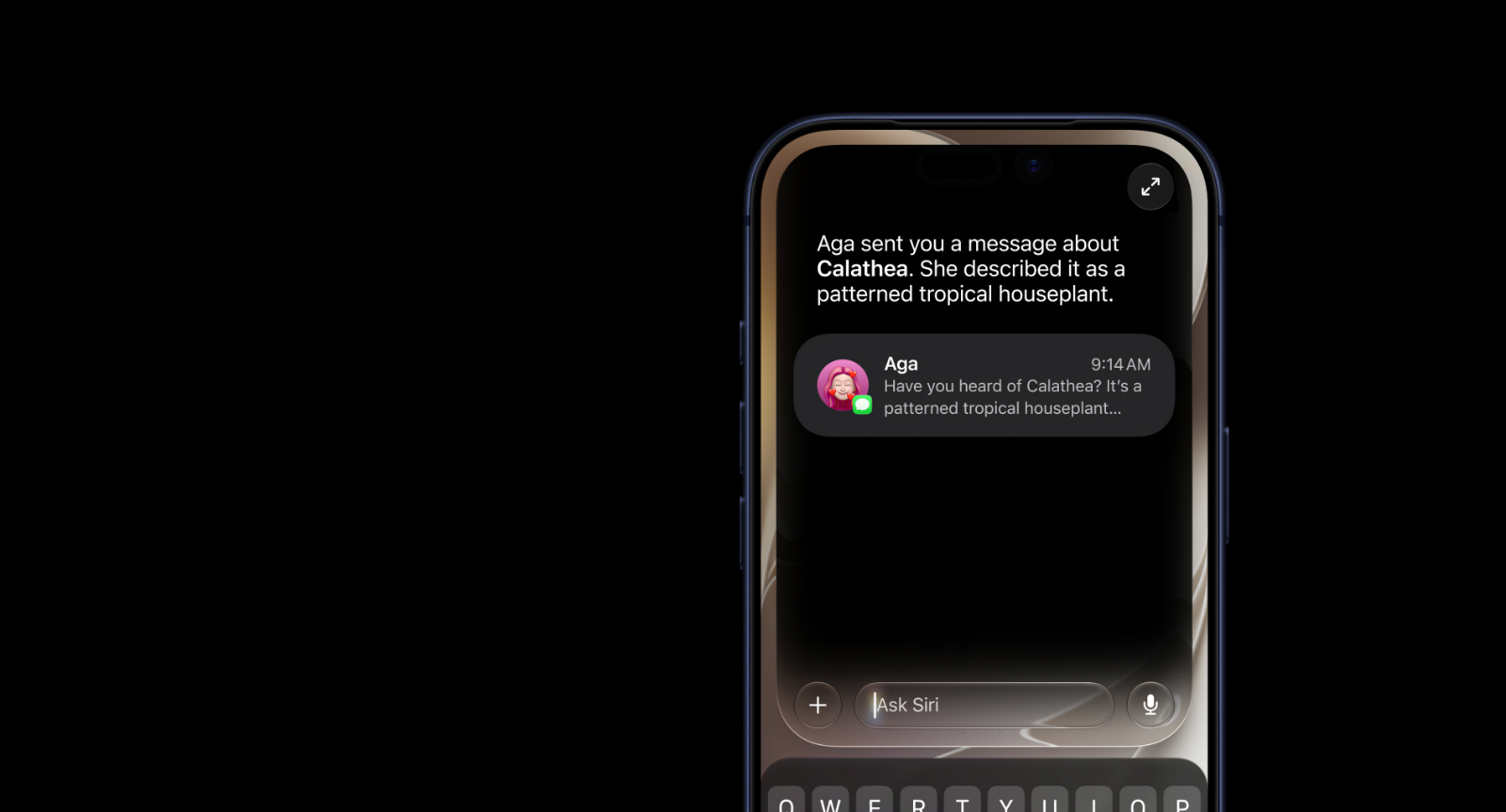
Apple is clearly trying to move Siri beyond timers, weather requests, and simple commands into something that can understand and complete more meaningful tasks.
Apple Intelligence Reaches More Everyday Apps
Apple Intelligence is expanding beyond isolated writing and image tools. In iOS 27, Apple is positioning it as a layer that works across the apps people already use every day, including Photos, Messages, and Safari.
The major Apple Intelligence changes include:
- Smarter personal context search
- More useful help inside Photos
- New actions from Messages content
- Apple Intelligence assistance in Safari
- Improved image creation and editing tools
- Better organization and task support across apps
Apple’s approach appears to be less about giving users a dedicated app for all purposes and more about building useful intelligence into existing apps on the iPhone and across the entire ecosystem.
New Features For Photos, Safari, Messages, And Wallet
Photos, Safari, Messages, and Wallet are among the apps that will receive some of the most visible iOS 27 changes.
Photos
Photos is getting more advanced with iOS 27 through intelligent search and editing tools. Apple says that users will be able to find images more naturally through Siri AI, while Apple Intelligence can help make photo work feel less manual. The goal is to make it easier to locate old memories and manage a growing library without endless scrolling.
Safari
Safari is expected to gain more Apple Intelligence support for finding information and managing browser tasks. Apple has not positioned it as a full replacement for search engines yet, but the update should make it easier to get help while researching, reading, and handling multiple tabs.
Messages
The Messages app is now more aware of context and can take actions accordingly in iOS 27. Apple has shown users being able to turn details from conversations into reminders or notes, which could be useful for plans, tasks, addresses, events, and things people promise they will remember but absolutely will not.

Wallet And Apple Cash
Wallet is also getting smarter, particularly for users who rely on Apple Cash. Apple says that users will be able to split bills using Apple Cash and Apple Intelligence, making it easier to settle group expenses after meals, travel, or shared purchases.
Better Family Safety And Accessibility Tools
Apart from all the shiny new toys, the company is also making iOS 27 on the iPhone safer for children, along with broader accessibility improvements. These changes may not get the biggest keynote applause, but they could be among the most meaningful additions for families and users who rely on accessibility features every day.
Family Safety And Screen Time
Apple has announced new parental controls and more flexible Screen Time tools. Families will be able to manage time allowances across categories such as:
- Entertainment
- Games
- Social media
- Other selected app categories
Apple is also expanding child safety protections across its platforms, with more tools designed to help manage access and usage without having to constantly inspect every app manually.
Accessibility Improvements
iOS 27 will also add Apple Intelligence powered accessibility features, which include the following improvements:
- VoiceOver
- Magnifier
- Voice Control
- Accessibility Reader
- Natural language navigation
- More detailed descriptions of visual content
These tools are designed to help users navigate apps, understand content, and control devices more naturally.
Important iOS 27 Availability Limits
Not every iPhone will receive every iOS 27 feature, something to keep in mind before you install the update. The basic update may reach a wider range of supported devices, but the most advanced Siri AI and Apple Intelligence tools depend on compatible hardware, supported languages, and rollout timing.
Apple has said that Apple Intelligence is supported on iPhone 15 Pro and newer models, including the iPhone 16 and iPhone 17 lineup. However, some features may also be limited by location or local regulations, such as in the EU.
There is also one important regional limitation that you should know. Apple stated that Siri AI will not ship in the European Union alongside the initial iOS 27 and iPadOS 27 release because of issues related to the Digital Markets Act.
When Will Apple Officially Release iOS 27 Update For The iPhone
As mentioned earlier, iOS 27 is currently available as a developer beta for supported iPhone models, with a public beta expected to arrive in a few weeks. Apple will release the final version of the update to all compatible iPhone models in the fall, shortly after the new iPhone 18 Pro models.
Keep in mind that some of the Apple Intelligence and Siri AI features will require newer hardware and may not be available in every country or language at launch.
iOS 27 Is Apple’s Biggest AI Focus Yet
iOS 27 is shaping up to be Apple’s most AI focused iPhone update yet, even though some of these features were supposed to arrive in the previous year. Siri AI will get most of the attention, but the more important shift is that Apple Intelligence is now being deeply integrated into the apps people already use on a daily basis.
The update still has to prove itself in real world usage, especially as Apple continues testing the software. On the flip side, iOS 27 has a clearer direction than previous Apple Intelligence releases, as the company is no longer presenting AI as a collection of side features. Instead, it is trying to make it part of how the iPhone works.
Leave A Reply